

Ya Still Gotta Come to Work in the Morning
Case Study - Electric Utility Work
Posted by Charlie Recksieck
on 2026-06-11
After twenty years working in software, I've learned that the companies with the best operational results often aren't the ones chasing full automation.
Electric CAD Design
For a lot of those twenty years, I’ve worked with power companies on their distribution design systems. That means I've helped them have very visual maps in AutoCAD where designers can click on an item and get both the engineering values and material lists for a new pole, transformer, and service line.
There is a lot of time-saving automation that a utility design system can do, and so many reasons for this to be done in a program like AUD (Automated Utility Design) currently offered by Spatial Business Systems.
As much automation as there is, at some point human designers need to oversee the project and exert human choices. To do that, you don't want the program to be so complicated where these electrical designers need to also be software developers or configuration experts.
There needs to be human control. Which is why my most successful electric utility project involved visual forms.
My History with the Industry
I started with the AUD product at the inventing company, Gentry Systems, and moved with them when Autodesk bought it - it runs inside AutoCAD as third-party software.
So, I've been around with AUD for a long time. It's a complicated product that does so many amazing things for design. I'm a fan and an advocate. But I will say that it's also prone to have demos and salesman promising it handling all design easily. In reality, I'd say it handles about 80% to 95% of electric utility design work easily.
The hard part is what happens to that other 5 to 20 percent?
Don't get me wrong - I LOVE automating. I think software developers like me love to come up with solutions to handle as many things as possible. I think it's cool, though keep in mind that I'm a nerd.
Client Wanted a Slightly Different Approach
I'm not going to refer to this client by name. They have been terrific and I contracted with them for 20 years. But historically they've been very careful about not publicizing things; they've even requested innocuous social media shoutouts to be taken down. Utilities are very private, given their sensitive client information.
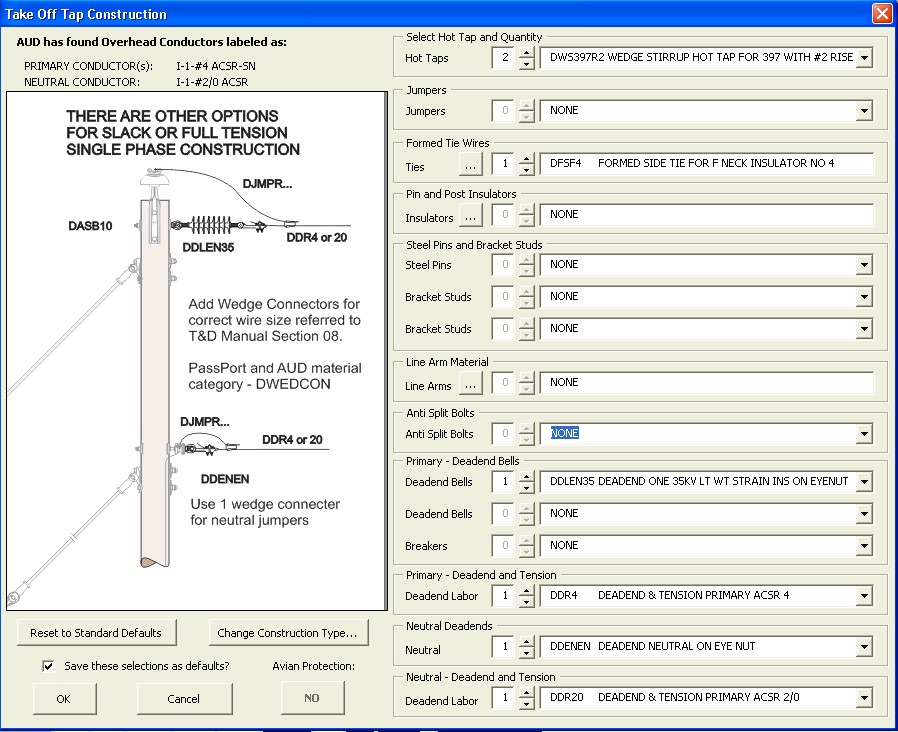
As the AUD product was being changed in the early 2010s they came to me with an interesting idea. While the core product started by elaborately tweaking settings before doing layout - they thought to do layout traditionally, then when clicking on items to order material, then have designers make decisions in visual forms.
Logic & Power Companies' Secret
You would think that electric engineering decisions are all by the book, so the logic choices for the code would be something that should match company policy.
Every utility had lots and lots of standards manuals. The problem was having too many of them not enough.
But here's the dirty little secret of utilities: You would think everything is standard, but i had scenarios asking about which kind of connectors for a takeoff pole - and the answer would be:
"Ken does it this way, Matt does it another way."
That answer sounds absurd in an engineering environment, but it happened constantly. There were a lot of arcane scenarios that would pop up for a designer once every 2 or 3 weeks - not every day - where something unique had to be figured out.
Those 80/20 scenarios are always tough in any business - 80% of the logic decisions are routine, but what do you do with the 20% of situations that really need to be thought through?
The Ways Design Gets Done
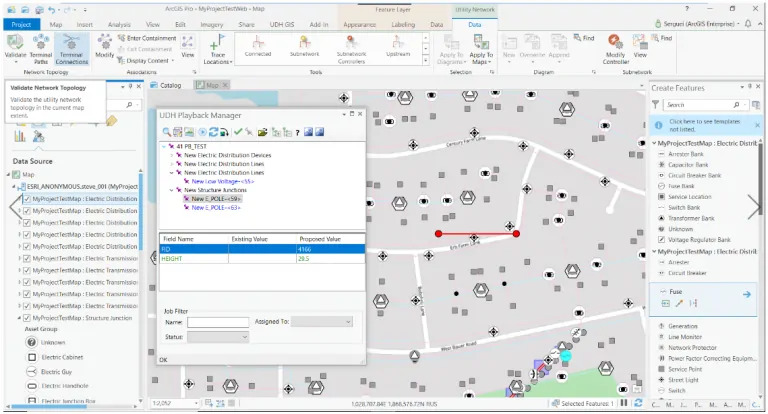
I just wanted to show you how the "normal', core AUD product looks. Once an AUD implementation is done, it has tons of engineering and physical values stored, and decision logic is configured into a format for the product to know what to tag AutoCAD line and block elements with. And the material to be ordered is mapped to these tags/values.
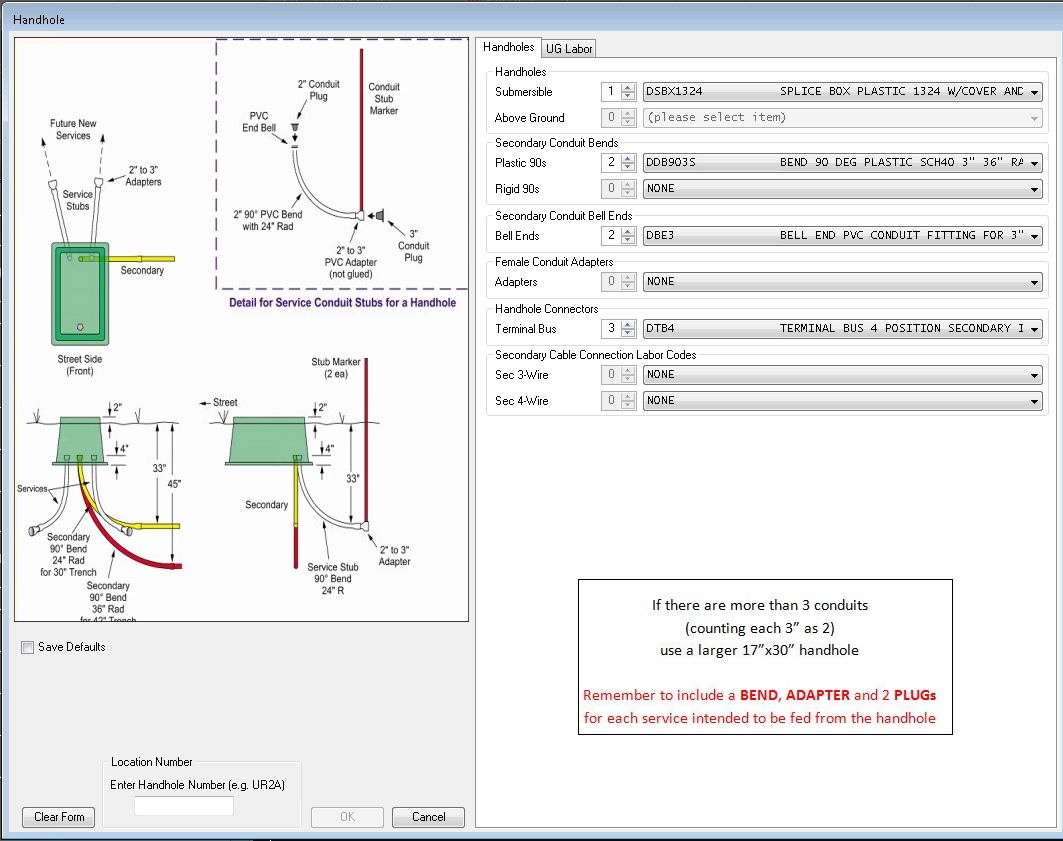 Whereas for this client's project, maps still looked like maps.
But their separate philosophy was to design, then click on an object (Handhole example here, like an underground box) - where our code would put this form in front of the designer.
Whereas for this client's project, maps still looked like maps.
But their separate philosophy was to design, then click on an object (Handhole example here, like an underground box) - where our code would put this form in front of the designer. All of the possible values go into the available choices on the combo boxes. But it's still flexible enough to choose any one of 3 or 4 methods and types of materials, depending on the real-world situation (tight corner, size of conduit, etc.).
As you can see, this is also a great opportunity to show a page from a standards manual right there in the form immediately.
Humans Need Choices
The idea is how to make running this design software easier for people with less training to do this job. Less-trained employees (aka "cheaper") are always an appealing thing for decision making executives at power companies.
Power companies are so regulated that they’re likely to be one of the last industries handing things over to AI. There are going to be humans needing to make these decisions for years to come - which makes electric utilities a regulated outlier compared to other industries which will give AI more of a role.
There was a terrific project manager at this company who I worked with for years. He’s since retired but if he's reading this: Bob, hope you're doing well!
When I would present Bob with some unusual judgment call situations and offer code solutions - he would say to let the designer choose:
"At some point, they gotta come to work in the morning."
Project Success
I'm not writing this like an ad for Plannedscape's great services ... although I'm not denying this project was a huge success.
The utility became known internally for unusually accurate design estimates. And it's largely because of this system they designed. Which is not a small thing - the efficiency $ gains for accuracy and speed of design is very provable. Furthermore, state regulation board penalties for misleading or inaccurate estimates are massive and prohibitive.
It didn't come cheap. The main portion of this project took 2 and a half years to complete with us, and they threw a lot of money and resources at it. But I do think the results are quantifiable.
That's where things get tough. Money and long projects are very political at large utility companies.
Most decision makers are seduced by demos promising 100% automation (when it’s really more like 80%).
Everyone loves the 100% automation demo. But almost nobody wants to spend years building systems that support the messy 20%.
That messy 20% is where the productivity gains really are.
The Takeaway
It’s funny, but the most successful automation project I worked on intentionally gave humans more control.
